1. Go to Transactions > Upload File, then choose the correct File Format from the dropdown.
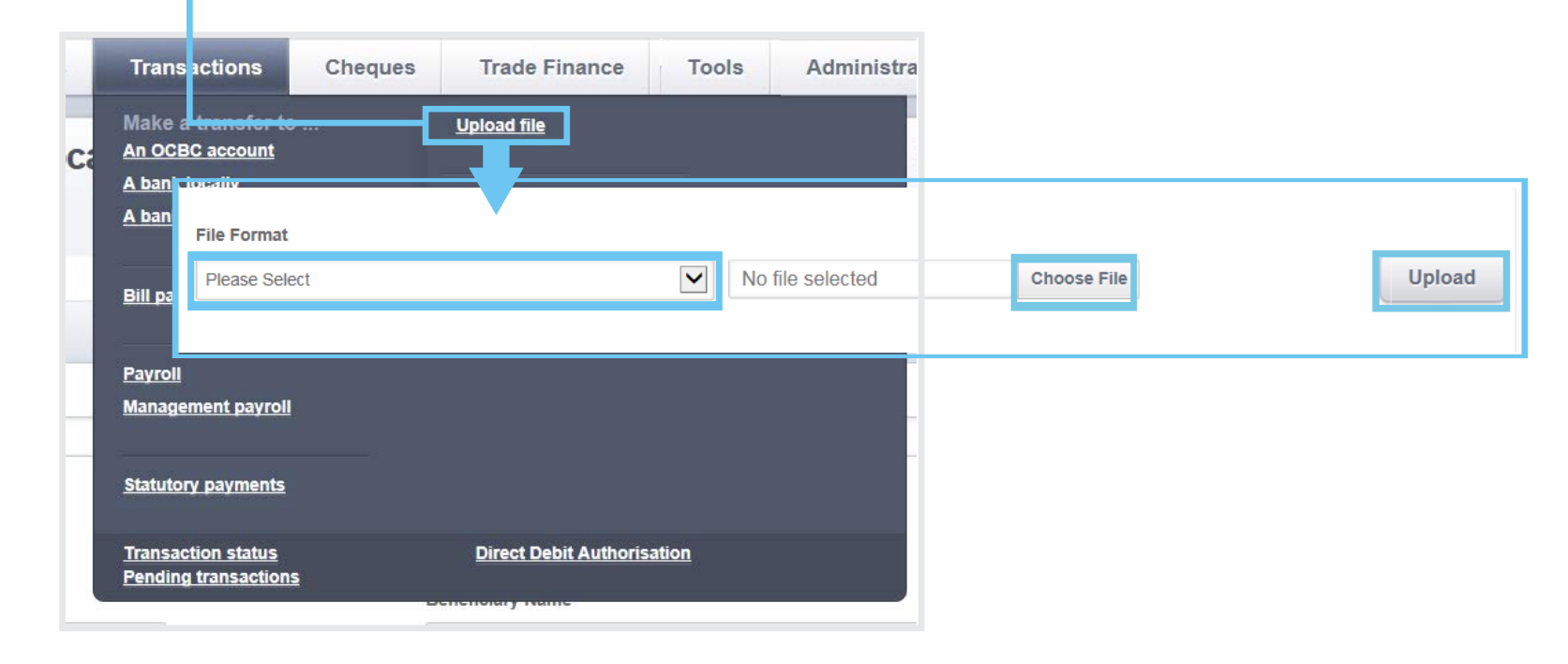
Choose the file format based on what you're paying:
Salary: GIRO Payroll Check ID (MY)
EPF: KWSP payment (MY)
SOCSO/EIS: SOCSO Contribution Payment
PCB: LHDN Monthly Tax Deduction (MTD)
Important Note: If this is your first time submitting statutory files, contact your bank to register your SOCSO, EPF, and LHDN employer reference numbers. After the bank updates these details, you’ll need to submit test files for EPF and SOCSO. Before uploading the test files, please reach out to us so we can convert your statutory file into the correct test format.
The Velocity approver must approve the test file so the bank can send it to the statutory bodies. You should receive approval letters from KWSP and PERKESO within 14 days. Once approved, you can upload the live EPF and SOCSO/EIS files and proceed with payment through your bank portal.
For more details on OCBC Velocity, please refer to the OCBC user guide.
Was this article helpful?
That’s Great!
Thank you for your feedback
Sorry! We couldn't be helpful
Thank you for your feedback
Feedback sent
We appreciate your effort and will try to fix the article