The Skim Kemalangan Bencana Bukan Pekerjaan (SKBBK) is an important social security contribution for eligible employees. Follow these simple steps to enable or update this contribution in the payroll system:
1. Navigate to Staff Directory > Select the employee > Payroll tab.
2. Under Employee Payroll Info, click Edit.
3. Scroll down to the Socso Details section and check the box for Does this employee contribute to Skim Kemalangan Bencana Bukan Pekerjaan (SKBBK)?
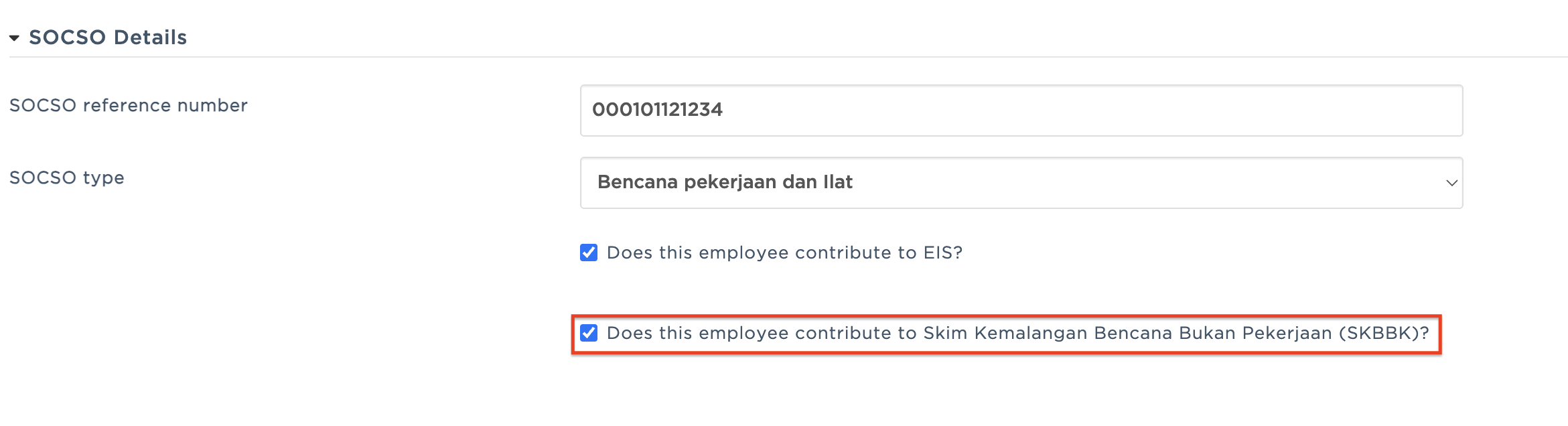
4. Review the selection and click Save at the bottom of the page to apply the changes.
Tip: Double-check that the employee's other SOCSO details are up to date before saving to prevent any payroll calculation discrepancies.
Was this article helpful?
That’s Great!
Thank you for your feedback
Sorry! We couldn't be helpful
Thank you for your feedback
Feedback sent
We appreciate your effort and will try to fix the article